
Ask a business owner what they would automate first and the answer usually comes quickly. It is the task that annoys them most, or the one a member of staff complains about loudest, or the one a software salesperson demonstrated last week. Very often it is the wrong one.
Not because it is unimportant, but because annoyance is a poor measure of value. The task that drives everyone mad may happen twice a month. The task that quietly eats an hour every day, and now and then produces an expensive mistake, nobody mentions, because everyone has got used to it.
This is the mistake I see most often when a business starts automating: choosing by irritation instead of by evidence. This article is about why it happens, how to pick the first task properly, which work is better left with a person, and what an automation keeps costing after it is built.
The mistake: automating the loudest task
Here is a typical version of it. It is a composite, not one particular client.
A clinic's practice manager hates the monthly report for the owners. It takes most of a Friday afternoon: numbers pulled from the booking system into a spreadsheet, checked, formatted, sent. It is the obvious thing to automate, everyone can see it, so it gets done first.
Meanwhile, at the front desk, every new patient's details are typed twice: once from the online booking form into the practice system, and again into the invoicing tool. Each time takes a couple of minutes. Nobody complains, because it is simply part of the job. But it happens many times a day, every day, and when a phone number or a date of birth is mistyped, the appointment reminder goes nowhere and the patient does not turn up.
The monthly report was a real annoyance. The double typing was the real cost. Automating the report first was not wasted money, but it spent the budget and everyone's goodwill on the smaller problem, and the bigger one was still there a year later.
Why it happens
Irritation is loud and frequency is quiet. A task that hurts once a month is remembered in detail; a task that costs three minutes forty times a week is not remembered at all, because no single instance of it is painful.
The people who decide are often not the people who do the work. An owner sees the report that lands on their desk, not the copying at the front desk that happens before anyone else arrives.
Demonstrations favour the impressive tasks. A tool that writes a report by itself looks far better on a screen than one that stops a phone number being typed twice, even though the second one may be worth ten times as much.
And mostly, nobody has counted. Without a number, the loudest opinion wins. None of this is anybody's fault. It is simply what happens when a decision is made without measurement.
Four questions that pick a good first candidate
Before anything is automated, I ask four questions about each candidate task.
**How often does it happen?** Daily beats monthly, almost always. A small saving repeated hundreds of times outgrows a big saving repeated twelve times.
**Does it follow the same rules every time?** If two people asked to do it would do it the same way, a computer can probably do it too. If the explanation starts with "well, it depends", it is not ready yet.
**Does the information already exist somewhere?** Copying a name from a form into another system is the easiest kind of work to remove. Deciding what to write in a reply to an unhappy client is not.
**What does a mistake cost?** A typo in an internal note costs nothing. A typo in an invoice, a dosage, an appointment time or a bank account number can cost a great deal, and sometimes a client.
The best first candidate scores well on all four: frequent, rule-bound, copying data that already exists, and expensive when it goes wrong. It is rarely the most interesting task in the business. It is usually the most boring one.
Count before you choose
You do not need a consultant for this. For two ordinary weeks, ask the people who do the work to note each repetitive task as it happens: what it was, how long it took, which system they copied from and into, and whether anything had to be corrected afterwards. A shared spreadsheet next to the desk, or a two-question form on a phone, is enough.
Two weeks is long enough to catch the weekly tasks and short enough that people keep it up. Avoid the quietest and the busiest weeks of the year. And write things down as they happen, not on Friday from memory, because memory forgets exactly the small interruptions that add up the most.
At the end, multiply how often each task happens by how long it takes, and add a separate line for corrections, since a mistake costs time twice: once to make and once to put right. The ranking that comes out is often a surprise, including to the people who did the counting.
Where the good candidates usually hide
The tasks that end up at the top of the list tend to come from a few families:
- **Copying between systems.** The same client, booking or job typed into two or three places.
- **Reminders and follow-ups.** Appointment reminders, "your document is ready" messages, a polite chase for an invoice that is fourteen days overdue. Same words, same timing, every time.
- **Documents built from data you already have.** An invoice from a finished job sheet, a certificate from a completed course, a confirmation from a booking.
- **Incoming paperwork.** Supplier invoices typed into the accounting software line by line.
That last family is changing quickly in parts of Europe. In Belgium, for example, structured electronic invoices became mandatory for transactions between Belgian VAT-registered companies on 1 January 2026, sent through the Peppol network, according to the Belgian Federal Public Service Finance. When supplier invoices already arrive as data a computer can read, retyping them by hand stops being a necessary chore and becomes a choice. If your suppliers already send structured invoices, or a similar rule is coming in your country, this is often one of the cheapest first automations there is.
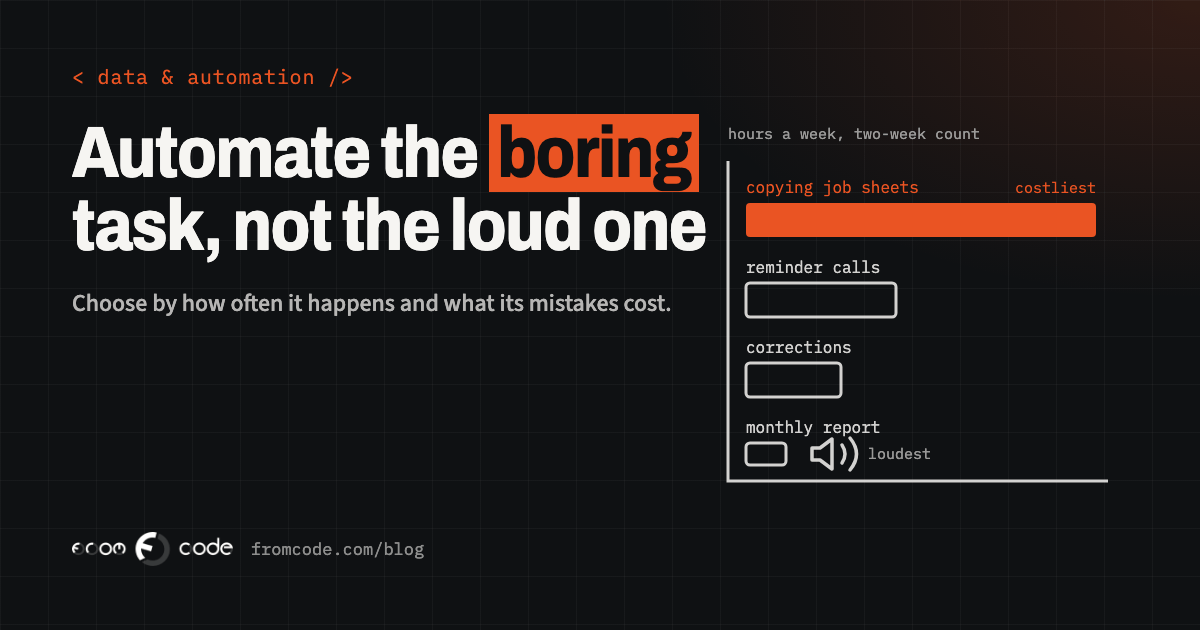
A heating and plumbing company with six engineers. Each engineer fills in a paper job sheet; the next morning, the office types it into the invoicing tool. The owner wants the monthly report automated first. The two-week count says:
job sheets typed into invoicing   about 60 a week, 4 minutes each  = 4 hours a week
reminder calls before visits      about 50 a week, 2 minutes each  = under 2 hours
monthly report for the owner      once a month, about 3 hours      = under 1 hour a week
corrections                       3 invoices with wrong hours or address, all from job sheets
The count points somewhere else. Four hours a week go into copying job sheets, and every correction came from that copying. A simple form on the engineers' phones that becomes the draft invoice removes the typing and the mistakes together. The report can wait: once the job data is clean and in one place, it very nearly builds itself.
What to leave alone
Some work should stay with a person, even when it could be automated:
- **Anything that needs judgement.** Whether a complaint deserves a refund, whether a new client is a good fit, whether an unusual request is genuine.
- **The conversations that keep clients.** The first call, a difficult message, an apology. Automating these saves minutes and costs relationships.
- **Rare tasks.** Something that happens four times a year is usually cheaper to do by hand than to build, test and look after.
- **Work whose rules nobody can state.** If the people who do it disagree about how it should be done, a computer will simply do one version of it, consistently, including when it is wrong.
- **The final check on anything irreversible.** Payments going out, records being deleted, a message going to every client at once.
The goal is not a business without people. It is people spending their time on the parts only people can do.
Do not automate a mess
Automation makes a process faster. It does not make it better. If a process has three unnecessary steps, the automated version runs those three steps faster and makes them harder to see.
Before automating anything, write the process down as it really happens, step by step, not as the manual says it should, and ask of each step: why do we do this? It is common to find steps that exist because of a system the business stopped using years ago, a copy that goes to someone who left, or an approval nobody remembers asking for. Remove those first.
Sometimes the simplified process turns out to be short enough that it no longer needs automating at all. That is the cheapest outcome there is.
An automation keeps costing after it is built
A finished automation is not free from then on. It runs on something, someone has to look after it, and it breaks when one of the systems it connects changes.
The running cost is easy to underestimate with connector tools that charge per run. Zapier, for example, started pricing its AI steps by model tier on 15 June 2026: a step on the Advanced tier, which is where new steps start, uses three times as many tasks per run as one on Standard, and the Premium tier five times, according to Zapier's own help page. That is fair pricing, but it means a step added because it seemed clever is paid for on every single run. For a task that happens a few times a month, it hardly matters. For one that happens hundreds of times a day, it can be the difference between a saving and a new monthly bill.
The other running cost is ownership. Someone has to notice when an automation stops, and know how to fix it. The rule I hold to: every automation has a named owner and sends a message when it fails. The most dangerous automation is the one that stopped quietly three weeks ago while everyone assumed it was still working.
Start with one step, and keep a person checking
The first version of an automation should do one step and let a person check the result. The job sheet becomes a draft invoice, and someone in the office looks at it before it goes out. The reminders are prepared, and the front desk sees a list of who will receive one tomorrow.
This sounds slower, and for a few weeks it is. But it shows you the cases the rules did not cover, the client with two addresses, the job split across two days, the patient who asked not to be texted, before they reach anyone outside the business. Once the checks stop finding anything, take the person out of that step and move on to the next one.
How to know it worked
Keep the spreadsheet from the two-week count. A month after the automation goes live, count another two ordinary weeks in exactly the same way.
If the time spent and the corrections have both dropped, you now have a number for what the automation is worth each month, and the best possible argument for, or against, the next one. If they have not, something is still being done by hand around the automation, and it is worth finding out what before building anything else. An automation that people quietly work around is not a saving. It is one more system to maintain.
What I would do first
If we sat down together this week, the plan would be short. Two weeks of counting, by the people who do the work. A ranking by how often, how long and what mistakes cost, not by who complains loudest. The top task written down step by step, with the pointless steps removed. One automated step, checked by a person, with an owner and an alert when it fails. Then another count a month later, before choosing the next task.
That is less exciting than automating everything at once. It is also how automation ends up paying for itself, instead of becoming one more thing nobody quite understands.
And if the count shows the manual work is small, the honest conclusion is that it is not worth automating yet. That is a good result too. It is money you did not spend. If you want a starting point for what a properly joined-up set of records looks like, One customer record instead of five spreadsheets covers the step that often comes right after this one.
Which task would you automate first?
Discuss your projectTell me what your team retypes most often, and I will tell you honestly whether it is worth automating.