
A clinic launches a new website in spring. By autumn a second doctor has joined, the booking form should ask one more question, and a staff member says the confirmation e-mail has not arrived since Tuesday. Three requests, one phone number to call, and a fair question in the owner’s head: which of these is already covered?
The answer depends on what was agreed for the time after launch. Many owners agree on the build in detail and settle the rest with a friendly sentence such as "we will look after it". That sentence can mean a monthly fee that watches the server, a bag of hours for small edits, a promise to answer when something breaks, or all three.
This article separates the jobs hiding inside the word "support", goes through five common beliefs about it, and gives you a one-page sheet to fill in with whoever looks after your system.
Five jobs inside one word
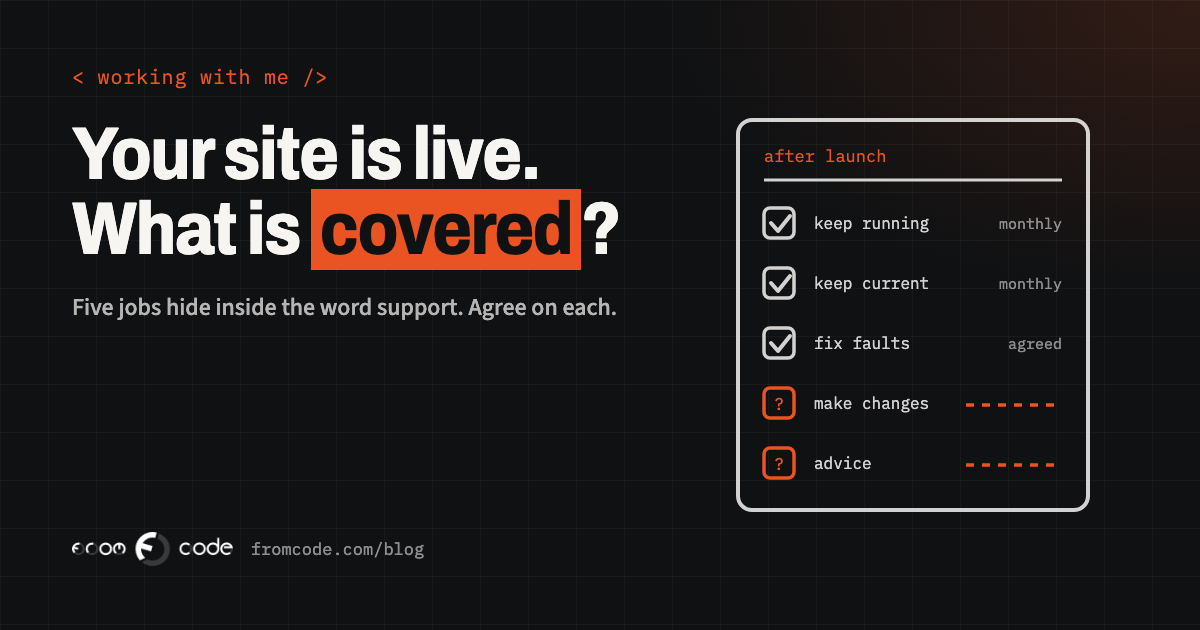
It helps to name the work before pricing it. Support for a website or business application usually mixes five jobs:
- Keeping it running: hosting, monitoring, backups, certificates and domain renewals.
- Keeping it current: updates to the platform, the programming language, plugins and libraries.
- Fixing faults: something that used to work, or was agreed to work, and no longer does.
- Making changes: new text, a new field, a new report, a new connection to another system.
- Advice: someone who knows your system and can say whether an idea is a small job or a large one.
Each job has its own rhythm. The first two happen on a calendar, whether or not you ask. Faults arrive without notice. Changes arrive when your business moves. Advice is needed before you commit money. A good arrangement says, for each of the five, who does it, how often, and how it is paid for.
Belief one: the fee covers whatever I ask for
The belief: you pay every month, so any request is part of the fee.
The reality: an arrangement is a list. Whatever is on the list is included, and everything else is a separate piece of work with its own price. That is healthy for both sides, as long as the list exists and you have read it.
Ask for the list in plain words. "Updates once a month, tested on a copy before they reach the live site" is a line you can check. "General maintenance" is a line that two people will read in two ways. The same goes for edits: a number of hours per month, with a clear note on whether unused hours carry over, is easier to live with than "small changes included", because nobody has agreed what small means.
It is also worth writing down your part. Support goes smoothly when one named person on your side sends requests, supplies texts and pictures, and confirms that a change looks right.
Fault or change: the question to settle early
Most disagreements after launch sit on one border: is this a fault or a change?
A fault is a difference between what was agreed and what happens. The confirmation e-mail that was in the scope and stopped arriving is a fault. A booking form that accepts a date in the past, when the scope said it should refuse it, is a fault.
A change is a new expectation. Adding a question to the form, offering appointments on Saturdays for the new doctor, or sending a reminder the day before are changes, even when each looks tiny on screen.
Some cases sit in between. A browser update makes a menu behave differently. A connected calendar service changes how it accepts data. Nobody did anything wrong, and work is still needed. Decide in advance how these are treated: inside the monthly fee, or quoted separately. The written scope from the build is the reference point for faults, so keep it somewhere you can find it.
A request that gets handled quickly
When something looks wrong, the speed of the fix depends heavily on the first message. Four details save most of the back and forth:
- What you did, step by step.
- What you expected to see.
- What appeared instead, with a screenshot.
- When it happened, on which device and in which browser.
Add how much it affects the day. "Patients cannot book at all" and "the footer year is old" deserve different speeds, and the person reading the message can only sort them if you say which is which. Send requests through one agreed channel, such as a shared inbox or a ticket list, so that nothing lives only in somebody’s phone.
Belief two: once it is live, it stays as it is
The belief: the site is finished, so it can be left alone until you want something new.
The reality: the software underneath keeps moving. PHP, the language behind many websites, publishes an end date for security fixes on every version. According to the official PHP page on supported versions, security support for PHP 8.2 ends on 31 December 2026, while 8.3 is covered until the end of 2027 and 8.4 until the end of 2028. A site running on 8.2 will still open on 1 January, and it will have stopped receiving security fixes for that version.
Other languages and platforms follow their own calendars. Your support arrangement should say who watches those dates, who tests the move to a newer version, and whether that upgrade is part of the fee or a planned job of its own. A useful habit is to ask once a year for a short list: what your system runs on, and until when each piece is supported.
Updates: who clicks, who checks
Updates are where "automatic" and "looked after" are easy to confuse. WordPress is a good example. Its official guide to updating explains that minor and security updates can install automatically, while major feature releases still need someone to click, and it advises making a backup before you start.
So the questions for your arrangement are practical ones:
- Which updates install by themselves, and which wait for a person?
- Are the larger ones tried on a copy of the site first?
- After an update, who checks that the booking form, the contact form and the payment of a deposit still work?
- If something breaks, how is the previous state brought back, and when was that last tried?
A short list of the pages that matter most, checked after every larger update, is worth more than a long promise.
The things that expire
Some of the most visible outages come from things that simply expire: a domain name, a hosting plan, a payment card on file, a key that lets your site talk to another service, the certificate that puts the padlock in the browser.
Certificates are a timely example, because their lives are getting shorter. Let’s Encrypt, a widely used free issuer, has published its schedule: its default certificates move from 90 days to 64 days on 10 February 2027, and to 45 days in February 2028. Renewal that runs by itself, with a warning when it fails, becomes more valuable as the interval shrinks. A job that relies on a person remembering every two months deserves a second look.
Ask for one table: each thing that renews, the date, whose account it sits in, whose card pays, and who receives the warning.
Belief three: fast support means everything is fixed fast
The belief: a quick reply means a quick fix.
The reality: these are two separate promises. A response time says how soon a person reads your message and tells you what happens next. A fix time says how soon the problem is gone, and that depends on the cause, which may sit with a hosting provider or another company’s service.
A workable arrangement names a few levels. For example: the system cannot be used; an important task is blocked but there is a way around it; something is wrong and the work carries on. For each level, write the response time, the hours during which it applies, and the way to reach someone outside those hours if that is part of the deal. Round-the-clock cover costs more because a person has to be available, so pay for it only where a night-time failure would really hurt.
Belief four: the monthly fee includes new features
The belief: after a year of monthly payments, the system will have grown.
The reality: keeping something healthy and making it better are different budgets. A fee that covers monitoring, backups and updates can be money well spent while the screens look exactly the same twelve months later.
If you expect the system to grow, say so, and give growth its own line: a number of hours a month, or small projects quoted one at a time. A short list of wished-for improvements, reviewed every quarter, keeps this honest. You choose from the top of the list, you see the price before the work starts, and the ideas that can wait stay visible. Where a change turns out to be larger than it looks, my article on estimating a change request explains what usually hides underneath.
Belief five: someone else holds it, so I can forget it
The belief: the developer manages everything, so the owner has no need to know where things are.
The reality: the best support relationships leave the owner able to walk into any account. The domain, the hosting, the code, the e-mail service and the analytics should be registered to your business, with your developer invited as a user with the access they need. Then holidays, illness or a change of supplier are ordinary events.
Ask what happens when the arrangement ends: how much notice each side gives, what you receive, and whether anything runs on the supplier’s own accounts that would have to move. The article on what a software handover should contain gives the full list, and it applies just as well on the day support starts.
Monthly, by the hour or as needed
There are three common shapes, and each suits a different business.
Pay as needed: you call when something is wrong or new. It is simple and has no standing cost. It suits a small information site where a few days of waiting is acceptable, and it still needs an owner for updates and renewals.
A fixed monthly fee for care: monitoring, backups, updates and a stated response time, with changes priced separately. It suits a system your staff or customers use every day.
A monthly block of hours: care plus a set amount of change work. It suits a business that improves its system steadily. Agree what happens to unused hours and to work that goes over.
Compare offers line by line against the five jobs. A lower fee may leave two of them with nobody, and a higher one may include hours you will never use. Ask which costs are passed through at cost, such as the domain, hosting and paid add-ons, and which part pays for someone’s time.
The one-page support sheet
Fill this in together and keep a copy:
- Included each month: …
- Quoted separately: …
- How to send a request, and who sends it: …
- Response levels and hours: …
- Updates: which are automatic, which are tested first, what is checked afterwards: …
- Backups: how often, where they are kept, date of the last test of restoring one: …
- Renewals: item, date, account, payer: …
- Version end dates to watch: …
- Hours included, and what happens to unused ones: …
- Notice to end, and what you receive: …
If a line stays empty, that is your next conversation.
How to see that it is working
A monthly note of half a page is enough to show that the arrangement is alive. It can list the updates installed, the backups checked, any interruption and its cause, requests closed and still open, hours used, and the next date that needs a decision.
The note is useful in quiet months too. It tells you that someone looked, and it builds a history of your system that any future developer will thank you for.
If you are choosing support now, start with the sheet above and your list of what the business cannot do without for a day. If you already pay a fee, send the sheet to your supplier and fill the gaps together. Half an hour spent on it in a calm week makes the busy week much easier.
Who looks after your system after launch?
Discuss your projectTell me what your system does and what changes most often, and I will help you map out the support it needs.