
You ask your developer for something that sounds tiny. One more option on a form, a different wording in a reminder, a new column in a report. The answer comes back: two to three weeks, and a price that looks like it belongs to a much bigger job.
It is a frustrating moment, and a common one. Either the estimate is padded, or something is going on that you cannot see from where you sit. Often it is the second, and the good news is that you can see it, if the change is looked at the right way.
This article follows one made-up but very ordinary request from first message to finished work, so you can watch where the time actually goes. Then it covers the three different kinds of "small", why apps that have not been touched for a while carry a hidden first step, what AI coding tools do and do not change, and how to describe and estimate a change so the number makes sense to both sides.
The request: one dropdown
Picture a physiotherapy clinic with five therapists and an online booking page. Patients choose a treatment, a day and a time, and get a confirmation and a reminder the day before.
The clinic manager notices that returning patients keep phoning to ask for "the same therapist as last time". So she writes to the developer: *could we add a dropdown to the booking page so patients can pick their therapist?*
On the screen, that really is one dropdown. Five names, one choice. It is reasonable to expect it to take an afternoon.
What the dropdown touched
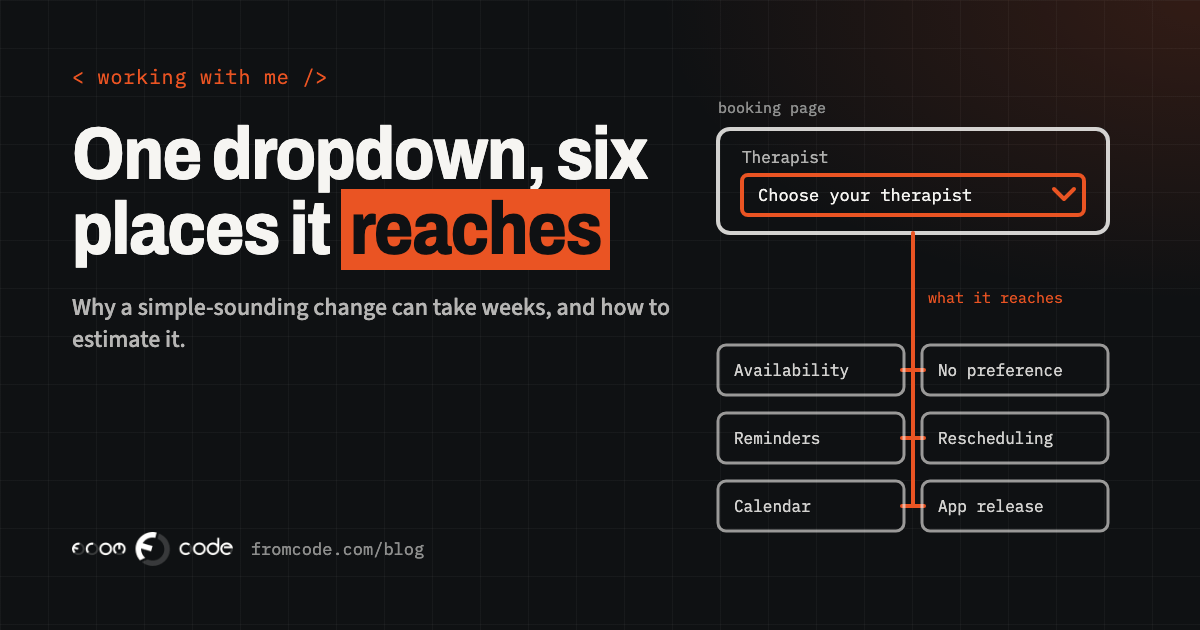
Here is what that dropdown actually reaches, once someone follows it through the system:
- Availability. Today the booking page shows a time as free if *any* therapist is free. With a choice, it has to show the free times of *that* therapist, which is a different calculation, and the one that decides whether two patients can be booked into the same slot.
- "No preference". Most patients will not care. The system needs a rule for them, and the clinic needs to decide it: the first free therapist, or spread the work evenly?
- Days off and holidays. Therapists' absences now matter on the public page, not just in the internal calendar.
- Confirmation and reminder messages. They should name the therapist. If a therapist is off sick and bookings move, the patient should hear about it.
- Rescheduling and cancelling. When a patient moves a booking, do they stay with the same person?
- The staff calendar and reports. If the clinic syncs bookings to a shared calendar or counts treatments per therapist, both need the new field.
- The mobile app, if there is one, which has its own booking screen and its own release process.
None of this is exotic. It is simply where the decision "which therapist" already lived, quietly, before anyone asked for it to be visible. The dropdown is the visible tip; the estimate is for the rest.
Why nobody can see it from the outside
It is tempting to think a developer knows all of this instantly. Usually they do not, and a good one says so.
A system that was built two years ago, or by someone else, holds many small decisions nobody wrote down. The only reliable way to know what a change touches is to look: read the parts of the code that deal with bookings, check where availability is calculated, see which messages are sent from where. That look is real work, and it is the part of the job you never see on the screen.
So when an estimate arrives before anyone has looked, it is a guess dressed as a number. When it arrives *after* a look, it should come with the list of places the change reaches. That list is what turns "three weeks?!" into "ah, I see".
The same request, written so it can be estimated:
Change
  Patients can choose a therapist when booking online.

Why
  Returning patients phone to ask for the same therapist.

Who uses it
  Patients on the booking page and in the app.
  Reception, who move bookings.

Decisions already made
  "No preference" books the first free therapist.
  Moving a booking keeps the same therapist if possible.

Must not change
  Existing bookings, reminders for bookings already made,
  the monthly treatment report.

Example
  Maria, returning patient, wants Georgi on Thursday afternoon.

By when, and why
  Before the new therapist starts on the 1st.
Half a page, no technical words, and every line removes a question the developer would otherwise have to ask, or guess.
Three kinds of small
Not every small change is the same kind of small. It helps to know which one you are asking for.
Small and contained. A wording change on one page, a new photo, a corrected phone number, a colour. Nothing else depends on it. In a well-built system, much of this should not need a developer at all: it should be editable from the admin. If it is not, that is worth fixing once.
Small on screen, wide underneath. The therapist dropdown. One visible control that changes a rule many parts of the system rely on. These are where the surprises live, and where an estimate needs that look first.
Small, but stuck behind something else. The change itself is easy, but it cannot go live until something around it is brought up to date. This one is the hardest to see from outside, and it has become more common.
When the app has not been touched for a while
Mobile apps are the clearest example of the third kind. Apple and Google regularly raise the minimum version of their tools that an update must be built with, and an app that has not been updated for a while has to catch up before *any* update can be sent.
Since 28 April 2026, Apple requires apps uploaded to App Store Connect to be built with Xcode 26 or later and the iOS 26 SDK (Apple's upcoming requirements page). Since 31 August 2026, Google Play requires new apps and app updates to target Android 16 (API level 36); the extension developers could request ran to 1 November 2026, so that grace period is now over (Android developers: target API level).
So if your app's last release was built a year ago, the "one dropdown" may first need the app moved to current tools, its libraries updated, and the whole thing tested again on current phones. That is not padding; it is the price of the app standing still. Websites have a quieter version of the same thing: an old framework or plugin version that has to be updated before a new feature can safely sit on top of it.
The useful habit here is a small, regular update, even when nothing new is needed. Then the next small change stays small.
Doesn't AI make small changes cheap now?
A fair question now: with AI writing code, shouldn't small changes be nearly free?
AI tools genuinely make the *typing* faster. They do much less for the parts that take the time in a change like the therapist dropdown: finding every place the rule lives, deciding what "no preference" means, and checking that existing bookings still behave. Developers themselves are cautious here. In Stack Overflow's 2025 Developer Survey, its most recent, 66% of respondents named "AI solutions that are almost right, but not quite" as a frustration, and 45% said debugging AI-generated code takes more time (Stack Overflow Developer Survey 2025, AI section).
"Almost right" in a booking system means two patients in the same slot. So the realistic effect of AI on an estimate is a modest saving on the writing, with the looking, deciding and checking still there. An estimate that has shrunk to minutes because "AI does it" deserves the same questions as one that looks too big.
How to describe a change so it can be estimated
You can make an estimate faster and more accurate before the developer opens a single file. A good change request answers six things:
- What should be possible afterwards, from the user's side, in one sentence.
- Why: the real problem behind it. Sometimes there is a simpler fix for the same problem.
- Who uses it: customers, staff, both, on which screens or devices.
- The decisions you have already made, like the "no preference" rule.
- What must stay exactly as it is.
- One real example, with names and days, and a date that matters, if there is one, with the reason.
Screenshots help more than descriptions. A photo of the sticky note at reception that says "Mrs Ivanova only sees Georgi" explains the need better than a paragraph.
What a good estimate looks like
A trustworthy estimate for a change like this is not just one number. Look for:
- A range, with what moves you to the top or bottom of it.
- The list of places the change reaches, in plain words, like the list earlier in this article.
- What is included and what is not: for example, the website now and the app in the next release.
- The open questions, and who needs to answer them.
- What "done" means: what you will be able to click on and check.
If the developer could not look yet, the honest answer is a short, paid look first, with its own small price, followed by a real estimate. That is the same principle described in what happens before I quote a project, applied to one change.
Splitting it into a smaller first step
When the number is bigger than the value of the change, the best move is rarely to push the price down. It is to make the change smaller in a useful way.
For the clinic, a first step could be a free-text field "preferred therapist (optional)" that reception sees and honours by hand. It solves the phone calls next week, touches almost nothing, and shows whether patients actually use it. If they do, the full version with per-therapist availability becomes the second step, priced with real information.
Most "small changes" have a version like this: the part that removes today's pain, without rebuilding the rule underneath yet.
Making the next change actually small
Whether a change is cheap is decided long before you ask for it. A few things keep small changes small:
- Content and settings in the admin, so wording, prices, opening hours and options do not need a developer.
- Automated tests on the paths that matter most, so checking a change takes minutes, not a day of clicking. Which tests to write first covers where to start.
- A test copy of the system, where changes are tried before they reach real customers.
- Regular, boring updates of the tools and libraries, so no change has to start with a catch-up.
- Short notes on the decisions inside the system: why "no preference" works the way it does. The next estimate starts from those notes instead of from guessing.
None of these is glamorous, and each one makes every future estimate shorter and more accurate.
Questions to ask when the number surprises you
When an estimate surprises you, these questions turn it into a conversation instead of a standoff:
- Which parts of the system does this change reach?
- Which part takes most of the time: understanding, building, or testing?
- Is there a smaller first step that solves most of the problem?
- Does anything need updating before the change can go live, and would that be needed anyway?
- What would make the estimate go up, and what can I decide now to keep it down?
A developer who answers these clearly is giving you the best possible information about your own system, which is worth having whatever you decide to do with the change.
When a small change is not small
A small change that turns out not to be small is rarely a sign that something is wrong. It is usually the system telling you where its important decisions live. Describing the change well, asking what it reaches, and splitting it when it is worth it, turns that moment into a clear choice.
And if the same simple request keeps coming back expensive, that is worth a closer look in itself: the answer might be an update, a setting in the admin, or, now and then, improving the system instead of replacing it.
Have a change that came back bigger than expected?
Discuss your projectSend me the request and the estimate, and I will tell you what it reaches.