
Most businesses I talk to do not have one system. They have a booking system, an accounting package, a mailbox with a shared calendar, a spreadsheet somebody built five years ago and a website form that sends e-mails to whoever happens to be on the list. Each one works. The trouble is in the gaps between them, where a person reads something on one screen and types it into another.
So the request sounds simple: "can you make these two talk to each other?" Sometimes the answer really is simple. More often the work hides in places nobody mentioned, because the person asking has never had to think about them, and the person selling the connection would rather not.
This article goes through the beliefs I hear most often about integrations, one by one, and what is actually true about each. None of them are foolish. They are what anyone would assume from the outside. Knowing where they break is the difference between an integration you forget about because it just works, and one you forget about until the accountant finds three months of missing invoices.
What an integration actually is
An integration is a piece of software whose only job is to move information from one system to another, and to do it correctly every time, without anyone watching.
That last part is the whole job. Moving a record once, by hand, while you look at it, is easy. Moving every record, at any hour, when one side is slow, when the other side has changed its rules, when the same client was entered twice with two spellings, is what an integration is for. Most of the effort goes into the cases where something is not quite right, not into the case where everything is.
In practice an integration answers four questions:
- **What moves?** Which records, which fields, in which direction.
- **When does it move?** The moment something changes, every few minutes, or once a night.
- **What does it mean on the other side?** How a "client" in one system becomes a "customer" in the other, with the right tax rate and the right status.
- **What happens when it fails?** Who finds out, what is retried, and what a person has to fix.
Every myth below is a way of skipping one of those questions.
Myth 1: "Both systems have an API, so it is a day's work"
An API is the door a system offers so other software can read and write its data. Both systems having one means the doors exist. It does not mean they lead to the same room.
One system may let you create an invoice but not attach a payment to it. Another may give you appointments but not the reason for the visit. A third may allow only a limited number of requests per minute, which is fine for ten records and useless for the first import of ten years of history. Some doors need a paid plan, an approval from the vendor, or an administrator on your side to grant access.
None of this shows up in the brochure. It shows up when somebody reads the actual documentation and, better still, tries the calls against a test account. That is why I treat the first part of any integration as a short investigation, not as building: a day or two of checking that every piece of information the business needs can actually get in and out, before anyone promises a delivery date.
Myth 2: "Once it is connected, it is finished"
An integration connects two systems that are each owned by somebody else, and both keep changing. Vendors add required fields, rename things, retire old versions of their API and switch off ways of signing in that they no longer consider safe.
A current example: Microsoft has been retiring Exchange Web Services, the older way other programs read and write Exchange Online mailboxes and calendars. According to Microsoft's own deprecation page, it started to be disabled for all organisations in October 2026 and is due to be fully disabled in April 2027, with Microsoft Graph as the replacement. Any tool that books meetings into Outlook calendars or files e-mails into a system through the old route has to be moved, whether or not anybody at the business has ever heard the name.
That is normal, not a scandal. It does mean an integration is not a purchase you make once; it is a small piece of machinery you keep. Before building one, decide who will notice when a vendor announces a change, and who will make the adjustment. If the honest answer is "nobody", the integration will work beautifully until the day it quietly stops.
Myth 3: "The data means the same thing on both sides"
This is the one that costs the most, because it fails without an error.
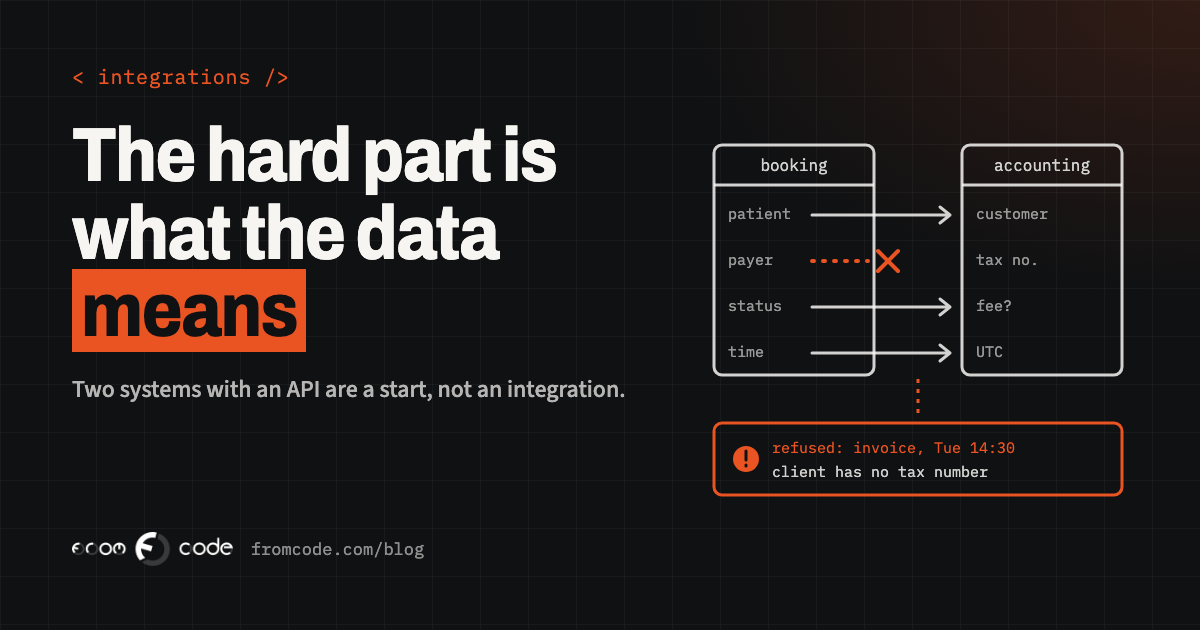
Take a clinic whose booking system has "patients" and whose accounting package has "customers". A patient who books for their child, a company that pays for its employees' check-ups, a patient whose insurer pays part of the bill: in the booking system these are all one appointment with one name. In the accounting package they may need to be three different customers, or one customer with a different payer. Copy the name across and everything looks fine, until the invoice goes to the wrong person.
The same happens with statuses. "Cancelled" in a booking system may mean the client cancelled, the clinic cancelled, or the slot was moved. Accounting may need to know which, because one of them carries a fee. Dates and times are another quiet trap: a system that stores the local time and one that stores universal time will agree for most of the year and disagree around the clock change.
The fix is unglamorous: a written mapping. Every field that moves, what it is called on each side, what each value means, and what happens to values that do not fit. Writing it down usually takes a conversation with the people who use both systems every day, and that conversation is where the unwritten rules come out.
Myth 4: "It either works, or it fails loudly"
The worst integrations do not crash. They skip.
A request times out, and the record it carried is never sent again. A request times out after it actually succeeded, and the retry creates the same invoice twice. A field arrives empty because someone left it blank in the form, the other system refuses the whole record, and the refusal goes into a log no person reads. Everything else keeps flowing, so nobody suspects anything for weeks.
What a well-built integration does instead:
- It keeps a record of every item it tried to move, and whether it arrived.
- It can safely send the same thing twice without creating a duplicate, because each item carries an identifier the other side recognises.
- It retries things that failed for a temporary reason, and stops retrying things that will never succeed.
- It tells a named person, in plain words, about the things that need a human: "Invoice for appointment 14:30 on Tuesday was refused: the client has no tax number."
If I could ask for only one feature in an integration, it would be that last one. A failure you are told about is a five-minute fix. A failure you discover at the end of the quarter is an afternoon of detective work, and a conversation with your accountant you would rather not have.
Myth 5: "A ready-made connector is always the cheaper option"
Connector services, the kind where you pick a trigger in one app and an action in another, are genuinely good. For a simple, low-stakes flow between two popular tools, a new enquiry into a shared spreadsheet, a calendar event into a team chat, they are often the right answer, and I would rather set one up in an hour than build something nobody needs.
They stop being cheap in three situations. When the data needs real translation, as in Myth 3, the logic ends up spread across dozens of small steps that only the person who built them can read. When the volume grows, many of these services charge per task or per run, so the bill rises with the business. And when one of the systems is your own, or an older one with no ready-made connector, there is nothing to click.
The question to ask is not "code or no code". It is: if this stops working on a Friday evening, who can open it, understand it and fix it? A connector flow with a clear owner and a short written description is fine. A flow nobody understands is the same risk whether it was clicked together or written by hand.
Myth 6: "Real time is always better"
Instant updates sound better, and sometimes they matter. A booking taken online should block that slot everywhere at once, or two people end up in the same chair at the same time.
Many flows do not need that. An accounting package that receives the day's invoices once in the evening is often easier to check, easier to correct and easier to explain to an accountant than one that receives a stream of single changes all day. A nightly run also gives a natural moment to compare totals: so many appointments, so many invoices, this much in total, on both sides.
So decide flow by flow. Ask what goes wrong if the information arrives an hour late. If the answer is "two people book the same slot", it needs to be immediate. If the answer is "nothing much", a scheduled run is simpler, cheaper to keep, and much easier to reason about when something looks off.
The question that prevents most problems: which system is right?
When two systems both hold the same information, sooner or later they will disagree. A client changes their phone number in the booking app, the office updates the address in accounting, and now there are two versions of the truth.
The cleanest integrations decide, for each kind of information, which system owns it. The booking system owns appointments. Accounting owns invoices and payments. The customer records live in one place, and the others receive copies they do not edit. Information flows in one direction for each kind of record, and when someone needs to correct it, they correct it at the source.
Two-way synchronisation, where both sides can edit and the integration merges the changes, is possible. It is also several times harder to get right, because the integration has to decide what to do when both sides changed the same thing at once. I only recommend it when the business genuinely needs people to edit in both places, and I would rather change a habit than build a referee.
Where the rules are heading
Some integrations are not a choice. Tax authorities and public bodies are moving from documents people read to data systems exchange.
In the EU, the VAT in the Digital Age package, adopted on 11 March 2025, already allows member states to require electronic invoicing for domestic transactions, subject to conditions, and brings in digital reporting for business-to-business transactions between EU countries from 1 July 2030. An electronic invoice in this sense is structured data a system can read, not a PDF attached to an e-mail. Each country sets its own timetable for domestic sales, so check what applies where you invoice.
For a small business this mostly means one thing: the path from your own system to your accounting package, and from there onwards, will matter more over the next few years, not less. If invoices are retyped today, that is the gap worth closing first, and closing it properly, with the mapping and the failure handling above, rather than as a quick copy that will need to be rebuilt.
What I would do first
When someone asks me to connect two systems, the first steps are almost always the same:
- Sit with the person who does the retyping today and watch them do it. Their workarounds are the specification.
- Write the mapping: what moves, in which direction, what each field means on both sides, and which system owns it.
- Try every piece of it against test accounts on both sides, before estimating the build.
- Decide, flow by flow, whether it needs to be immediate or can run on a schedule.
- Agree who is told when something fails, and what the message says.
- Build it, run it alongside the manual process for a short while, compare the results, and only then stop the retyping.
Step six is the one people want to skip, and the one that catches the mapping mistakes while they are still cheap. For deciding which gap to close first, Which manual work to automate first goes through how I weigh the options.
- Which records move, in which direction, and how often?
- Which system owns each kind of information?
- What happens to a record the other side refuses?
- Can the same record be sent twice without creating a duplicate?
- Who is told when something fails, and how?
- What does it cost to run each month, and does that grow with volume?
- Who notices when one of the vendors changes their API, and who adjusts it?
- Can someone other than the builder understand and fix it?
An answer of "we will see" to any of these is not a reason to stop. It is the part of the estimate that is still missing.
Which two systems in your business should be talking?
Discuss your projectTell me what gets retyped between them, and I will tell you what connecting them really involves.