
The renewal e-mail arrives, and the number is higher than last year. Not dramatically, perhaps, but it was higher last year too. The booking system the clinic runs on charges per member of staff, and you have hired two more. The job-scheduling app your engineers use has moved the one feature you rely on into a more expensive plan. The e-mail and office suite has gone up for everyone at once. Add the lines together and the business is now paying, every month, for software it has never owned and never will.
Sooner or later the question comes: would it be cheaper to have our own system built, pay once, and stop renting?
Sometimes the honest answer is yes. Often it is no. And the decision usually gets made on the strength of a few beliefs that sound sensible and are only half true. This article goes through the ones I hear most, what is actually true about each, and how to work out the answer for your own business with your own figures.
Why the question comes up now
Software prices rising is not your imagination, and it is not only the small vendors. Microsoft announced in December 2025 that most of its business plans would cost more from 1 July 2026: on its US list prices, Microsoft 365 Business Basic went from $6.00 to $7.00 per user per month and Business Standard from $12.50 to $14.00, while Business Premium stayed at $22.00 (Microsoft: Microsoft 365 pricing and packaging updates). Microsoft notes that prices vary by country and currency, so check your own invoice rather than these figures.
When the biggest supplier in the room raises prices, smaller ones tend to feel free to follow. Many tools also price per person, so a growing business pays more every year even when the price list does not change at all. That is the moment owners start asking whether there is a way out.
Myth 1: "Building our own is always cheaper in the long run"
The belief: a subscription is money gone for ever, while a system you own is paid once and then it is yours.
The reality: a system you own is paid for once and then paid for a little every month, for as long as you use it. It needs a server or a cloud account to run on. It needs updates when the browsers, phones and libraries it depends on change, and security fixes when a weakness is found in any of them. It needs backups that someone has actually tried restoring. And it needs a person who understands how it works, available when something breaks on a Monday morning.
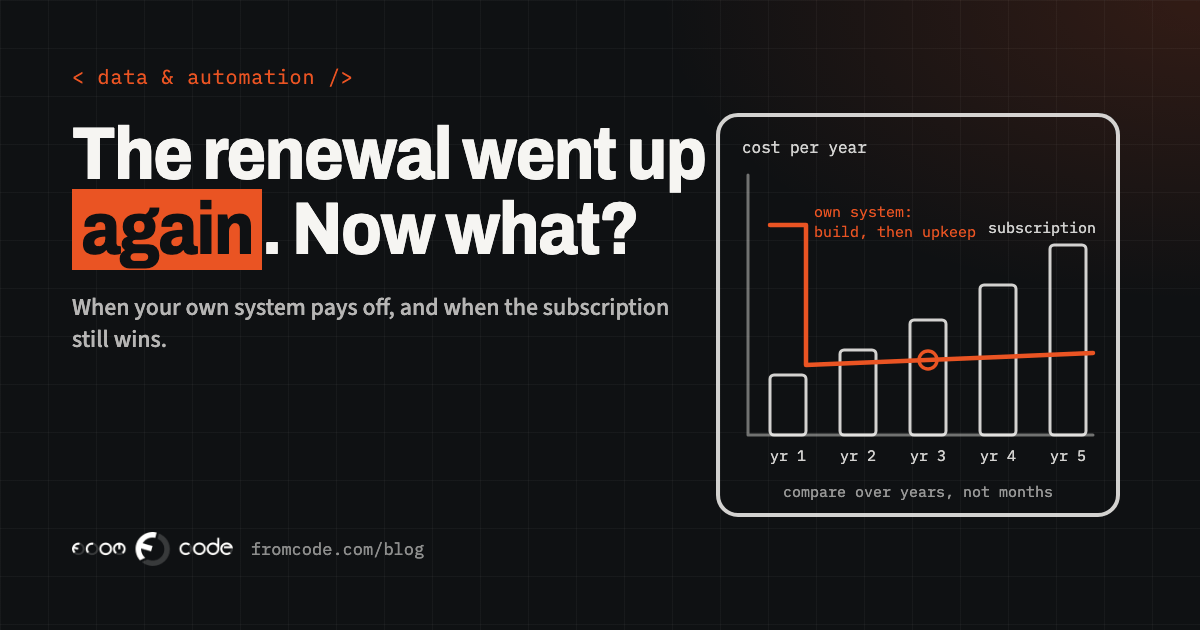
None of that makes your own system expensive. It makes it a different kind of cost: a larger amount at the start, then a smaller, steadier amount for upkeep. A fair comparison puts both sides over the same number of years, with the upkeep included. Leave the upkeep out and your own system will always look cheaper on paper, right up until the first year it needs work.
Myth 2: "The price rise is the problem"
The belief: the vendor raised the price, so the vendor is the problem.
The reality: before blaming the price, look at what you are paying for. Most businesses that have used the same tools for a few years are paying for people who have left, for accounts nobody logs into, and for a higher plan that was chosen for one feature which nobody uses any more.
Start with a simple list: every subscription, what it costs a year, how many seats, and who actually used it in the last month. Most admin panels show the last sign-in date for each person. Then ask, for each tool, whether everyone needs the same plan. With Microsoft 365, for example, staff who only need e-mail and web versions of the office apps may not need the same plan as staff who work in the desktop apps all day.
Tidying up seats and plans takes an afternoon and costs nothing. It does not stop next year's rise, but it means you compare a building project against what you genuinely need to pay, not against a bill full of waste.
Myth 3: "We are locked in, so we have no choice"
The belief: once all your records live in someone else's system, leaving is impossible.
The reality: leaving is usually possible and often harder than it should be, which is a different thing. The question to answer now, before you decide anything, is whether you can get your own data out in a form another system can read.
The law has moved on this in the EU. The Data Act has applied since 12 September 2025, and the European Commission's own summary says it requires cloud software providers to let customers export their data, at a minimum in a commonly used, machine-readable format, and that it removes switching charges entirely from 12 January 2027 (European Commission: Data Act explained). Until that date, providers may still charge for the costs of switching. How each vendor applies the rules to your contract is a question for the contract and, if it matters, a lawyer.
The practical step is simpler than the law: run a full export this month. Open the file. Check that the bookings, the client notes, the attached documents and the history are all there, and that you could make sense of them without the vendor's screens. If the export is complete and readable, you have far more freedom than you thought. If it is not, you have learned that before you needed it.
Myth 4: "Our own system means no more subscriptions"
The belief: once we have our own system, the subscriptions disappear.
The reality: some of them should never disappear. E-mail, calendars, accounting and payroll are areas where a mature service, used by thousands of other businesses, follows tax rules and security standards that would be expensive and pointless to rebuild for one company. Replacing your accounting package with something custom is almost never a good use of money.
Your own system earns its place in a different spot: the part of the business that is specific to you. The way a training company tracks which trainee has which certificate, and when it expires. The way a service company assigns jobs, records what was done on site and turns it into an invoice. The way a clinic handles a waiting list that no off-the-shelf tool quite fits. That is the work you are currently forcing into a general-purpose tool, paying per person for the privilege, and working around with spreadsheets on the side.
Myth 5: "It is all or nothing"
The belief: either we keep paying for everything, or we replace everything.
The reality: the best answer is very often in the middle. Keep the services that do commodity jobs well. Replace the one tool where the pricing scales against you or where the business bends itself to fit the software. And connect the pieces, so information is typed in once and flows to where it is needed.
A middle path also lowers the risk. A smaller custom system, built around one part of the work and connected to the tools you keep, is cheaper to build, quicker to get into use and easier to change than a single system that tries to do everything. If it works well, you can extend it. If the subscription for something else becomes unreasonable later, you have a foundation to grow from.
How to compare honestly
Here is the comparison I would write down, on one page, with your own numbers.
On the subscription side: what the tool costs this year with the seats you genuinely need, what it is likely to cost as the team grows (seats times the price), and what the workarounds cost in staff time: the spreadsheet someone maintains next to it, the double entry, the hour on Friday spent reconciling.
On the own-system side: the cost to build the part you actually need, the yearly cost to run it (hosting, backups, monitoring), and a realistic yearly amount for upkeep and small changes. Ask whoever quotes for the build to state that upkeep figure too. If they cannot, that tells you something.
Then put both columns over the same period, five years is a reasonable horizon for business software, and look at where the lines cross. If they never cross, keep the subscription and stop worrying about it. If they cross early, you have a real case. If they cross late, the decision rests on the things money does not show: how well the tool fits, how much control you want, and how much the workarounds annoy the people who use them every day.
When your own system is cheaper
Your own system tends to come out ahead when several of these are true at once:
- the price is per person and your team is growing, so the bill grows every year with no change in what you get
- the part of the work involved is specific to your business, and the tool forces you into its way of working
- staff keep spreadsheets next to the tool because it cannot do what they need
- you are paying for a large plan to use one or two features
- your data is central to the business and you want to decide where it lives and who can reach it
One or two of these on their own is usually not enough. Three or four together usually is worth a proper look.
When the subscription is the better deal
The subscription tends to stay the better deal when the job is a common one done the same way by everyone (e-mail, accounting, video calls), when your team is small and stable, when the tool fits your work well and the rise is merely irritating, or when the area is heavily regulated and the vendor carries that burden for you.
It also stays the better deal when nobody will look after your own system. A custom system that nobody maintains does not stay cheap. It slowly becomes the old program that everyone is afraid to touch, and then you are paying to replace it.
If you build, own it properly
If you do decide to build, make sure you would own what you pay for: the code, the data, the server accounts and the domain, all in the business's name. A custom system that only one person can change, on an account in their name, swaps a subscription you can cancel for a dependency you cannot. Ask for the handover documents from the first month, not at the end.
- List every subscription, its yearly cost, its seats and who used it last month.
- Remove leavers and unused seats, and check whether everyone needs the same plan.
- Run a full data export from your main tool and check it is complete.
- Write down what the workarounds cost in staff time each week.
- Compare both options over five years, with upkeep included on your side.
What I would do
A rising subscription is a good moment to ask the question, and a poor reason on its own to answer it. Start by tidying what you pay for and testing your export. That costs nothing and gives you a clear, honest picture. Then compare over years, not months, with the upkeep included.
If the numbers show the subscription is still the better deal, renew it with a clear conscience. If they show that one part of your business has outgrown a general tool, build that part, own it properly, and keep everything else that already works.
Which subscription went up most for you this year?
Discuss your projectTell me what you pay for and how your team works, and I will help you see whether your own system would actually pay off.