
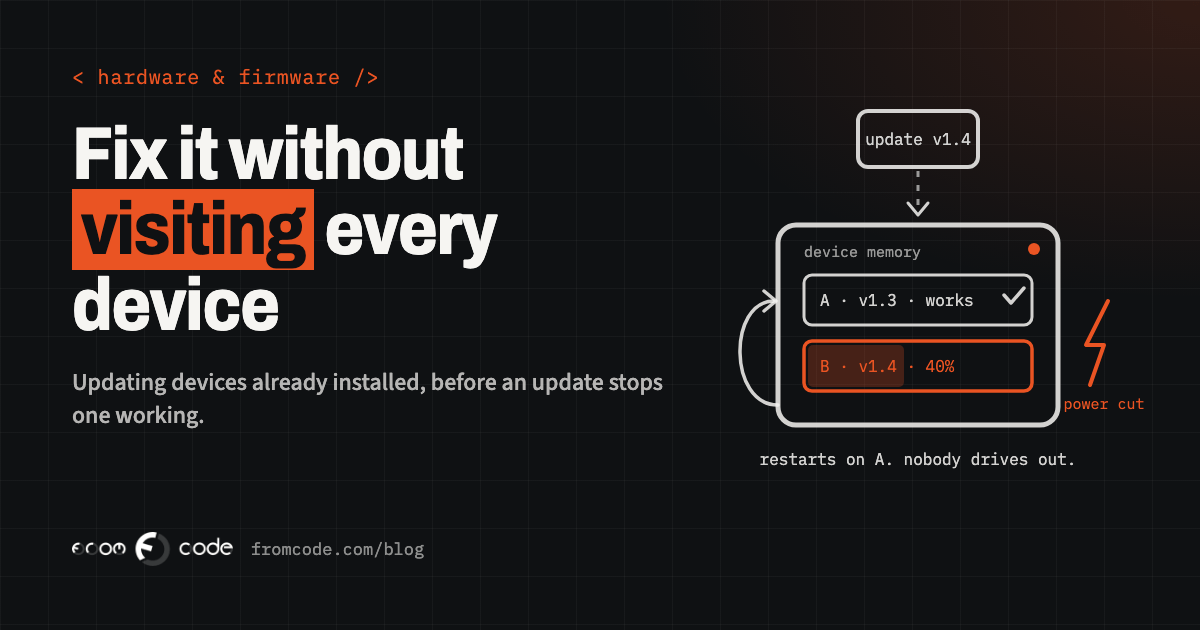
Here is a question I ask every company that makes a physical device, before we talk about anything else: if you found a fault in the device's software tomorrow, how would you fix the ones that are already out there?
The answers are revealing. "We would send someone round." "Customers can plug it into a laptop." "The supplier said it updates itself." And sometimes, after a pause: "We wouldn't. We'd replace them."
Picture a small company that makes a temperature logger for medicine fridges in clinics and pharmacies. A few hundred units sit in buildings across the country, each one quietly recording and sending an alert when a fridge gets too warm. Then a customer notices that after a power cut, the logger comes back with the wrong time, and the alerts arrive with the wrong timestamps. The fix in the code is ten lines. Getting those ten lines into every logger is the real project.
That company is an illustration, not a client. But the situation is common, and it is the same whether the device is a door controller in a gym, a sensor in a greenhouse, a ticket validator or a heating controller a service company installs in homes. Software inside a device is still software. It has bugs, it needs security fixes, and it will need to change. The question is whether you can change it without visiting every unit.
This piece goes through the questions I would want answered, ideally before the first device leaves the building, and what to do if they were not.
Why is a device harder to fix than a website?
For a website or an app, an update is something you take for granted. You change the code, publish it, and everybody has the new version within minutes or days.
A device is different in three ways. It is in someone else's building, often in a cupboard, on a wall or behind a ceiling panel. It may have a weak or patchy connection, or none at all most of the time. And if an update goes wrong, there is nobody standing next to it who can fix it. A phone with a broken app still has a screen and a person holding it. A sensor with broken software simply goes quiet.
That is why updating devices in the field is a design decision, not a feature you add at the end. Everything below follows from it.
Can your device update itself at all?
There are really only three ways new software reaches a device that is already installed:
- **Someone visits it.** An engineer turns up with a laptop and a cable. This is reliable and very slow, and it gets more expensive with every unit you sell.
- **The customer does it.** They download a file and plug the device into a computer, or press a button in an app. This works for some products and customers, and fails quietly for the rest. The units that most need the fix are often the ones whose owners never get round to it.
- **The device updates itself over its own connection.** People call this "over the air". It is the only option that scales, and the only one where you can be sure the fix actually arrived.
Many products start with the first two and plan to add the third later. Later is the problem. A device that was not designed to receive updates over the air usually cannot be taught to do it with an update, because the part that would do the receiving was never put there.
What happens if the power goes off halfway through?
This is the question that separates an update system from a liability.
An update means writing new software into the device's memory. If the power goes off, the battery runs out or the connection drops halfway through, you can end up with half of the old software and half of the new, and a device that will not start. Engineers call this "bricking", because the device becomes as useful as a brick.
The well-tried answer is to keep **two copies**. The device runs from one copy while the new version is written into the other. Only when the new copy has arrived whole, and been checked, does the device switch to it. If the new version then fails to start properly, or cannot reach home within a set time, the device switches back to the copy that worked. You will hear this called an A/B layout with rollback.
It costs something: the device needs enough memory for two copies, and that has to be decided when the electronics are chosen. It is one of the cheapest insurance policies in the whole project if you decide it early, and one of the most expensive if you discover you need it after a few hundred units are installed.
How does the device know the update really came from you?
A device that accepts new software over a connection will run whatever it is given, unless it is told not to. That makes the update channel the most attractive way in for anyone who wants to misuse your device.
So every update should be **signed**: stamped with a private key that only you hold, which the device checks before it installs anything. If the stamp does not match, the device refuses the file. The key itself has to be looked after properly. It should not sit on a developer's laptop or in an e-mail, and there should be a written answer to the question "what happens if this person leaves?"
Two related points that often get skipped. The device should refuse to go back to an old version with a known security hole, unless you deliberately allow it. And the connection the update arrives over should be encrypted, so nobody can read or tamper with it on the way.
Who gets the update first?
The temptation, once a fix is ready, is to send it to everything at once. Resist it.
A sensible rollout goes in rings. First the units on your own desk and in your own building. Then a handful of real installations, ideally ones whose owners know you and would ring you rather than leave a review. Then a larger group. Then everyone. Between each ring you wait, and you look at what the devices are telling you.
The other half of this is a **pause button**. If something looks wrong at the second ring, you need to be able to stop the rollout with one action, without writing new code. If stopping it means a developer logging into a server at night, it will not happen fast enough.
This sounds slow. In practice the first rings take days, not weeks, and the slowness is the point: a fault that reaches a few units is an inconvenience, while one that reaches all of them can become a crisis.
In September 2026, owners of some Samsung refrigerators in South Korea reported on Samsung's own forums that their fridges had gone offline and stopped cooling after a software update. Samsung told Fortune that an error had occurred during testing of a refrigerator software update, that the problem was limited to South Korea, and that it had suspended the testing (Fortune, 25 September 2026).
Samsung has far more engineers than any small company. The lesson is not that they were careless. It is that a software update to a physical product can stop the product doing its one job, and that the people who notice first are the customers. Rings, a pause button and devices that report back are what turn that from a crisis into a quiet rollback.
How will you know it went wrong before your customers do?
Most small device companies find out about a bad update the same way: a customer rings. By then, the update has usually reached many more devices.
The fix is to have every device report a few plain facts after it updates: which version it is now running, whether it started cleanly, and whether its main job still works. For the temperature logger, that might be "version, time is correct, readings are arriving". On your side, that becomes a simple screen: how many devices are on each version, how many tried and failed, and which ones have not been heard from since.
This is the same idea as monitoring a website, applied to a fleet of devices. It does not need to be elaborate. It does need to exist before the first update goes out, because an update you cannot observe is a guess.
What about devices that are offline for weeks?
Real fleets are messy. Some devices are on a good connection all the time. Some wake up once an hour to save battery. Some sit in a basement and connect only when a technician walks past with a phone. Some are switched off for the summer.
That has two consequences. First, an update has to be patient. It should wait for a device to come online, check it has enough battery or power to finish, and resume a download rather than start again if the connection drops.
Second, you will always have several versions in the field at once. Your server, your app and any system the devices send data to must keep working with older versions, not only the newest. If a new version changes the format of what a device sends, the server has to understand both formats for as long as old devices are still out there. Forgetting this is a common way to break devices that never even received the update.
How long do you have to keep fixing it?
For a long time, how long a manufacturer kept fixing a device was a commercial decision. That is changing, and a small company selling devices in the UK or the EU should know where things stand.
In the UK, the product security regime under the PSTI Act has applied since 29 April 2024 to consumer products that connect to the internet or a network. Among other things, manufacturers must publish the minimum length of time they will provide security updates, with an end date, in plain language (GOV.UK).
In the EU, the Cyber Resilience Act entered into force on 10 December 2024. Its reporting obligations for manufacturers have applied since 11 September 2026, and its main obligations apply from 11 December 2027 (European Commission). The Act's stated aim includes tackling the lack of timely security updates, and it expects manufacturers to handle vulnerabilities across the life of their products.
I am not a lawyer, and which rules apply depends on what the product is and who buys it, so take advice on your own case. The practical point does not depend on the details: a promise to keep a device secure for a number of years is only a promise you can keep if you can actually deliver updates to it.
What if your devices are already out there without any of this?
Sometimes the devices are already out there and none of this was planned. That is not the end of the road, but it is worth being honest about the options.
If the device has a connection and some spare memory, it is often possible to add a careful update path, sometimes in two steps: first a small, well-tested update that only improves the updating itself, then the real fixes on top of it. Every step is riskier than it would have been from the start, so this is where the rings and a test bench of real units matter most.
If the device has no connection, or not enough memory for a safe update, the choice is usually between a field visit, a customer-led update with very clear instructions, or replacing units over time with a new version that does it properly. None of these is wrong. What is wrong is pretending the first batch can be fixed remotely when it cannot, and finding out after a security problem.
What I ask on the first call
When a company with a device comes to me, these are the questions I go through with them, in roughly this order:
- How many devices are in the field, which versions are they running, and do you actually know?
- How does each one connect, and how often?
- Is there room in its memory for two copies of the software?
- Who holds the key that signs updates, and where is it kept?
- If an update failed on one unit tonight, how would you find out, and how would you stop it reaching the rest?
- Does your server still understand the oldest device you have installed?
- What have you told customers about how long you will keep it updated?
Most companies can answer three or four of these with confidence. That is normal, and the gaps show where to start. The answers also tell me whether the next job is software on the device, software on the server, or a conversation about the next hardware revision.
So, how would you fix them?
Back to the question at the top: if you found a fault tomorrow, how would you fix the devices already out there?
A good answer sounds something like this. "We would sign a new version, send it to our own units, then to a few customers we know, watch the reports for a day or two, and then let it go to everyone. If anything looked wrong, we would press pause, and any unit that failed would go back to the old version on its own."
None of that is exotic. It is a set of decisions made early: two copies, a signature, rings, a pause button and devices that report back. Made early, they are a normal part of building the product. Made late, they can cost as much as the product itself.
So, what would your answer be?
How do updates reach your devices today?
Discuss your projectTell me what the device does and how it connects, and I will tell you where I would start.